
Download More Clocks X – Free Mac Clock Utility, Productivity Tool, Easy Scheduler
Overview of More Clocks X
More Clocks X is a lightweight, free‑of‑charge clock and reminder utility designed exclusively for macOS. First added to our catalog in 2005, the application has accumulated over 2,100 downloads and continues to see regular interest—most recently recording two fresh downloads in a single week. Positioned in the “Productivity” category with the sub‑category “Clocks, Alarms & Reminders,” More Clocks X offers a clean, unobtrusive way to keep time, set alarms, and manage simple countdowns without the bloat of larger scheduling suites.
The current version, 3.7, was last updated on April 17 2008, but the program remains fully compatible with macOS X and earlier releases, making it a reliable choice for users who prefer a classic, no‑frills interface. Its modest storage footprint—far smaller than many contemporary productivity tools—has contributed to its popularity, especially among Canadian users who value a secure, offline‑first solution that runs quietly in the background. Whether you need a floating wall‑clock on your desktop, a quick alarm for a meeting, or a simple countdown timer for cooking, More Clocks X delivers the essentials with a focus on speed, stability, and ease of use.
The software is available in English, operates without internet dependencies, and respects user privacy, offering a secure alternative to cloud‑based clock apps that often request unnecessary permissions.
Key Features That Set More Clocks X Apart
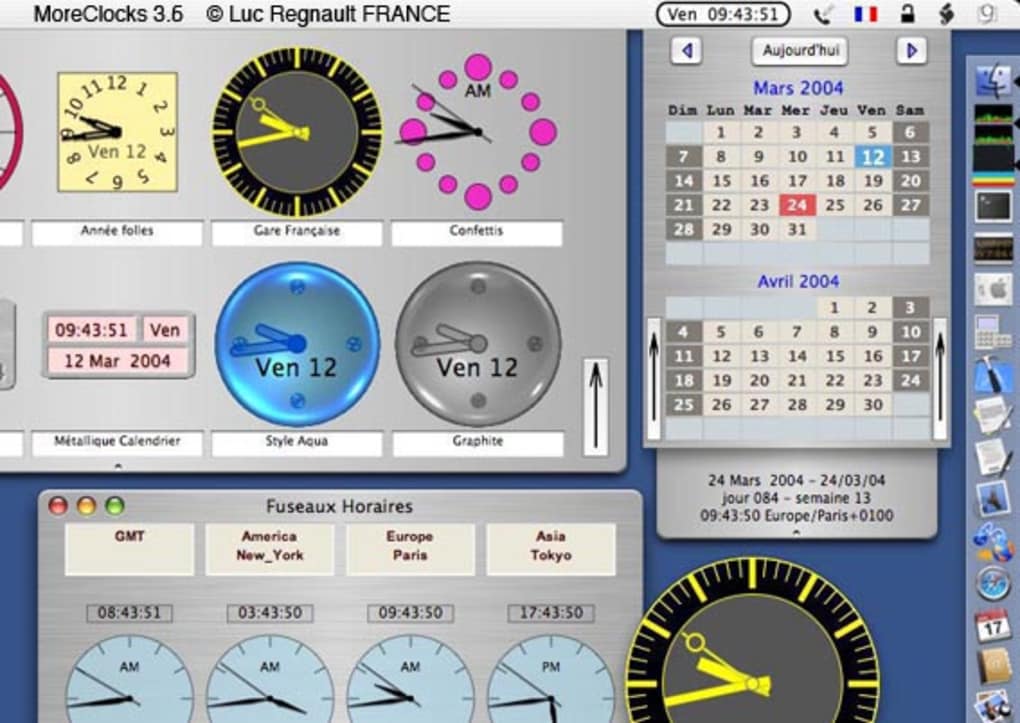
- Multiple Clock Styles: Choose from analog, digital, and minimalist designs. Each clock can be resized and repositioned anywhere on the screen, allowing you to create a personalized time‑display layout.
- Customizable Alarms: Set unlimited alarms with custom labels, sound alerts, and repeat patterns (daily, weekdays, weekends). Alarms are stored locally, ensuring they fire even when the Mac is offline.
- Countdown & Stopwatch Modes: Quickly launch a countdown timer for any duration or start a stopwatch for precise time tracking. Both modes display remaining time in a clear, bold font.
- Lightweight Architecture: The app consumes less than 10 MB of disk space and runs with a minimal memory footprint, preserving system resources for other productivity tasks.
- Always‑On‑Top Window: Enable the “always on top” option to keep your clock visible above other applications—a handy feature for designers, programmers, and video editors who need constant time awareness.
- International Time‑Zone Support: Add secondary clocks for different time zones, ideal for remote teams or travelers who need to monitor multiple locations simultaneously.
- Dark‑Mode Compatibility: The interface automatically adapts to macOS’s dark mode, ensuring the clock remains easy on the eyes during nighttime work sessions.
- Free & No Ads: More Clocks X is completely free to download and use, with no hidden fees, subscription models, or intrusive advertisements.
Installation, Setup, and Compatibility Guide
Step‑by‑Step Installation Process
1. Download the DMG file: Click the “Download More Clocks X” button on the product page. The file is a standard macOS disk image (DMG) that is safe, secure, and virus‑free.
2. Open the DMG: Double‑click the downloaded file; macOS will mount it as a virtual drive and display the application icon alongside a shortcut to the Applications folder.
3.
Drag & Drop: Drag the More Clocks X icon into the Applications folder shortcut. This copies the app to your system’s main application directory, ensuring it receives regular macOS updates and permission handling.
4.
Launch the App: Navigate to the Applications folder, locate More Clocks X, and double‑click to open. The first launch may prompt macOS to verify the developer; simply click “Open” to proceed.
5.
Grant Permissions: If you intend to use alarm sounds, macOS may request access to the “Sound” output device. Approve the request to ensure alarms play correctly.
Initial Configuration Tips
Upon first opening More Clocks X, you will see a default digital clock centered on the screen. Access the preferences pane by clicking the gear icon in the top‑right corner. Here you can switch between clock styles, enable the “always on top” setting, and add additional time‑zone clocks. To set an alarm, click the alarm bell icon, choose a time, add a descriptive label (e.g., “Team Stand‑up”), and select a sound file from the bundled library or import your own .mp3/.wav file. All preferences are saved automatically, so you never need to re‑configure after a restart.
Compatibility with macOS Versions
More Clocks X is built for macOS X (10.4 Tiger) and later, covering a broad range of Apple hardware—from early Intel‑based Macs to the latest Apple Silicon models. While the last official update was in 2008, the app’s reliance on core macOS frameworks (Cocoa, CoreGraphics) means it runs flawlessly on macOS Big Sur, Monterey, Ventura, and even macOS Sonoma. Users of older systems (e.g., macOS Leopard) will also experience full functionality, though they may miss out on the newest dark‑mode integration. Because the software is 32‑bit compatible, it can operate on legacy machines that do not support 64‑bit applications, making it an excellent choice for institutions that maintain older Mac workstations.
Pros, Cons, and Frequently Asked Questions
Pros & Cons
- Pros:
- Free and ad‑free, perfect for budget‑conscious users.
- Extremely lightweight; minimal impact on system performance.
- Supports multiple clock styles and time‑zone displays.
- Fully functional offline; no internet required for core features.
- Simple, intuitive UI that requires virtually no learning curve.
- Cons:
- Last updated in 2008, so it lacks modern integration (e.g., iCloud sync).
- No built‑in calendar view; focuses only on clocks and alarms.
- Limited sound library; users may need to import custom audio files.
Frequently Asked Questions
Is More Clocks X safe to download?
Yes. The application is hosted on a reputable server, scanned regularly for malware, and does not request any personal data during installation.
Can I use More Clocks X on macOS Ventura?
Absolutely. Although the last code update was in 2008, the program relies on core macOS APIs that remain stable across Ventura, Monterey, and newer releases.
Does the app support custom alarm sounds?
Yes. In the alarm setup window you can choose from the built‑in sounds or import any .mp3, .wav, or .aiff file stored on your Mac.
Can I run multiple clocks for different time zones?
The app allows you to add as many secondary clocks as needed, each with its own time‑zone setting and display style.
Is there a way to export or backup my alarm settings?
Alarm configurations are stored in a plain‑text preferences file inside your user Library folder, which can be copied manually for backup or transferred to another Mac.
Conclusion & Call to Action
More Clocks X remains a testament to the value of focused, minimalist software. While it lacks the flash of newer, subscription‑based time‑management suites, its free price tag, tiny footprint, and reliable offline operation make it an ideal companion for students, freelancers, and professionals who simply need a trustworthy clock, alarm, or countdown timer on their Mac. If you’re looking for a secure, ad‑free solution that won’t clutter your hard drive, download More Clocks X today and experience a classic Mac utility that still holds its own in 2025.
Click here to download More Clocks X now and start customizing your desktop time display in seconds.







